ELN-LIMS Extensions
Introduction
The current aim of this extensions is to accommodate two groups of modifications:
Pure Configuration, enabling/disabling some features, to clean the interface and make it less confusing for non expert users. Very often also to add type extensions for types specified with another master data extension.
extending the interface to accommodate additional functionality without needing to deal with the internals.
Plugin structure
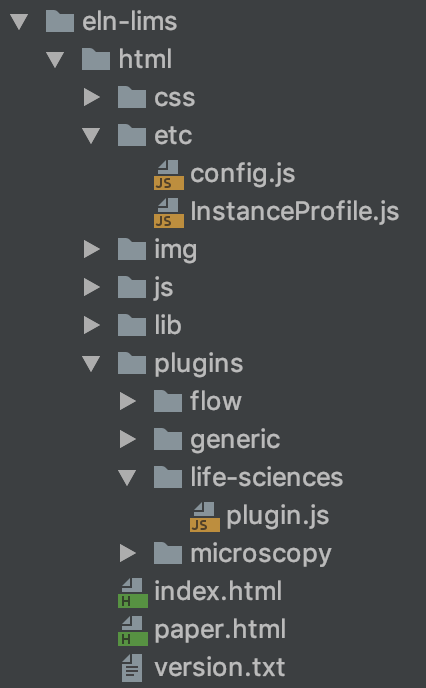
plugins folder
Each folder on this folder is a ELN UI extension.
Each extension currently contains a single file with name “plugin.js”.
config.js file
Contains a section called PLUGINS_CONFIGURATION indicating the plugins to be loaded from the plugins folder.
    var PLUGINS_CONFIGURATION = {
        extraPlugins : ["life-sciences", "flow", "microscopy"]
    }
plugin.js file
Contains the actual source of the plugin, we can distinguish three clear sections/patterns on the skeleton of the interface:
1. Configuring views through the use of a JSON structure. Part of this structure are:
forcedDisableRTF (Deprecated in favour of Custom Widgets configurable from the Instance Settings on the UI)
forceMonospaceFont (Deprecated in favour of Custom Widgets configurable from the Instance Settings on the UI)
experimentTypeDefinitionsExtension
sampleTypeDefinitionsExtension
dataSetTypeDefinitionsExtension
These are used extensively since they come at a very low development effort. Best examples of how to use these definition extensions can be found in technologies that ship with the ELN:
Generic Technology: https://sissource.ethz.ch/sispub/openbis/-/blob/master/ui-eln-lims/src/core-plugins/eln-lims/src/as/webapps/eln-lims/html/plugins/generic/plugin.js
Life Sciences Technology: https://sissource.ethz.ch/sispub/openbis/-/blob/master/ui-eln-lims/src/core-plugins/eln-lims/src/as/webapps/eln-lims/html/plugins/life-sciences/plugin.js
2. Extending views through the use of the Interceptor Pattern
Template Methods: ONLY allow to add content in certain portions of the Interface. ONLY available for Experiment, Sample and DataSet form views. These template methods are easy to use, they allow to add custom components isolating the programmer from the rest of the form.
experimentFormTop
experimentFormBottom
sampleFormTop
dataSetFormBottom
dataSetFormTop
dataSetFormBottom
Event Listeners: Allow to listen the before/after paint events for ALL form views and list views. Allow the programmer to change the model before is displayed and any part of the view after. Provide versatility but with added complexity of dealing with the complete form.
beforeViewPaint
afterViewPaint
Template methods are only needed to add custom components to from views. Best examples of how to use these can be found in technologies that ship with the ELN:
3. Other Extensions:
onSampleSave: Reserved for internal use and discouraged to use. It is tricky to use properly.
getExtraUtilities: Allows to extend the utilities menu. A great example is this template: https://sissource.ethz.ch/sispub/openbis/-/blob/master/ui-eln-lims/src/core-plugins/eln-lims/src/as/webapps/eln-lims/html/plugins/template-extra-utilities/plugin.js
Source Code Examples (plugin.js)
Configuration Only Extensions
An example with only type configurations extensions is show below.
    function MyTechnology() {
       this.init();
    }

    $.extend(MyTechnology.prototype, ELNLIMSPlugin.prototype, {
       init: function() {

       },
       experimentTypeDefinitionsExtension : {
            "FOLDER": {
                "TOOLBAR": { CREATE: false, FREEZE: false, EDIT: false, MOVE: false, DELETE: false, UPLOAD_DATASET: false, UPLOAD_DATASET_HELPER: false, EXPORT_ALL: false, EXPORT_METADATA: true }
            }
       },
       sampleTypeDefinitionsExtension : {
            "SAMPLE_TYPE" : {
                "TOOLBAR": { CREATE : true, EDIT : true, FREEZE : true, MOVE : true, COPY: true, DELETE : true, PRINT: true, HIERARCHY_GRAPH : true, HIERARCHY_TABLE : true, UPLOAD_DATASET : true, UPLOAD_DATASET_HELPER : true, EXPORT_ALL : true, EXPORT_METADATA : true, TEMPLATES : true, BARCODE : true },
                "SHOW" : false,
                "SAMPLE_CHILDREN_DISABLED": false,
                "SAMPLE_CHILDREN_ANY_TYPE_DISABLED" : false,
                "SAMPLE_PARENTS_DISABLED": false,
                "SAMPLE_PARENTS_ANY_TYPE_DISABLED": true,
                "SAMPLE_PARENTS_HINT": [{
                    "LABEL": "Parent Label",
                    "TYPE": "PARENT_TYPE",
                    "ANNOTATION_PROPERTIES": []
                }],
                "SAMPLE_CHILDREN_HINT" : [{
                    "LABEL": "Children Label",
                    "TYPE": "CHILDREN_TYPE",
                    "MIN_COUNT" : 0,
                    "ANNOTATION_PROPERTIES": [{"TYPE" : "ANNOTATION.SYSTEM.COMMENTS", "MANDATORY" : false }]
                }],
                "ENABLE_STORAGE" : false,
                "SHOW_ON_NAV": false,
                "SHOW_ON_NAV_FOR_PARENT_TYPES": undefined,
                extraToolbar : undefined
            },
       },
       dataSetTypeDefinitionsExtension : {
            "DATASET_TYPE" : {
                "TOOLBAR": { EDIT : true, FREEZE : true, MOVE : true, ARCHIVE : true, DELETE : true, HIERARCHY_TABLE : true, EXPORT_ALL : true, EXPORT_METADATA : true },
                "DATASET_PARENTS_DISABLED" : false,
                extraToolbar : undefined
            },
       }
    });

    profile.plugins.push(new MyTechnology());
Note: “SAMPLE_TYPE” and “DATASET_TYPE” of the example above should the names of actual types in the system.
Toolbar Extensions
An example with only toolbar extensions is shown below, variables with a dollar sign ‘$’ indicate they are jquery components:
    function MyTechnology() {
       this.init();
    }

    $.extend(MyTechnology.prototype, ELNLIMSPlugin.prototype, {
       init: function() {

       },
       sampleTypeDefinitionsExtension : {
            "SAMPLE_TYPE" : {
                extraToolbar : function(mode, sample) {
                    var toolbarModel = [];
                    if(mode === FormMode.VIEW) {
                        var $demoButton = FormUtil.getButtonWithIcon("glyphicon-heart", function () {
                            //This empty function could be a call to do something in particular
                        });
                        toolbarModel.push({ component : $demoButton, tooltip: "Demo" });
                    }
                    return toolbarModel;
                },
                extraToolbarDropdown : function(mode, sample) {
                    return {
                        label:"My label",
                        title:"Title",
                        action : function() {
                            //This empty function could be a call to do something in particular
                        }
                    }
                }
            },
       },
       dataSetTypeDefinitionsExtension : {
            "DATASET_TYPE" : {
                extraToolbar : function(mode, dataset) {
                    var toolbarModel = [];
                    if(mode === FormMode.VIEW) {
                        var $demoButton = FormUtil.getButtonWithIcon("glyphicon-heart", function () {
                            //This empty function could be a call to do something in particular
                        });
                        toolbarModel.push({ component : $demoButton, tooltip: "Demo" });
                    }
                    return toolbarModel;
                }
            },
       }
    });

    profile.plugins.push(new MyTechnology());
extraToolbar corresponds to a button on the toolbar menu. extraToolbarDropdown corresponds to an entry within “More” dropdown in the toolbar menu.
Note: “SAMPLE_TYPE” and “DATASET_TYPE” of the example above should the names of actual types. In that way, different toolbars can be specified.
Extra Views as Utilities
Please check the provided example: https://sissource.ethz.ch/sispub/openbis/-/blob/master/ui-eln-lims/src/core-plugins/eln-lims/src/as/webapps/eln-lims/html/plugins/template-extra-utilities/plugin.js